
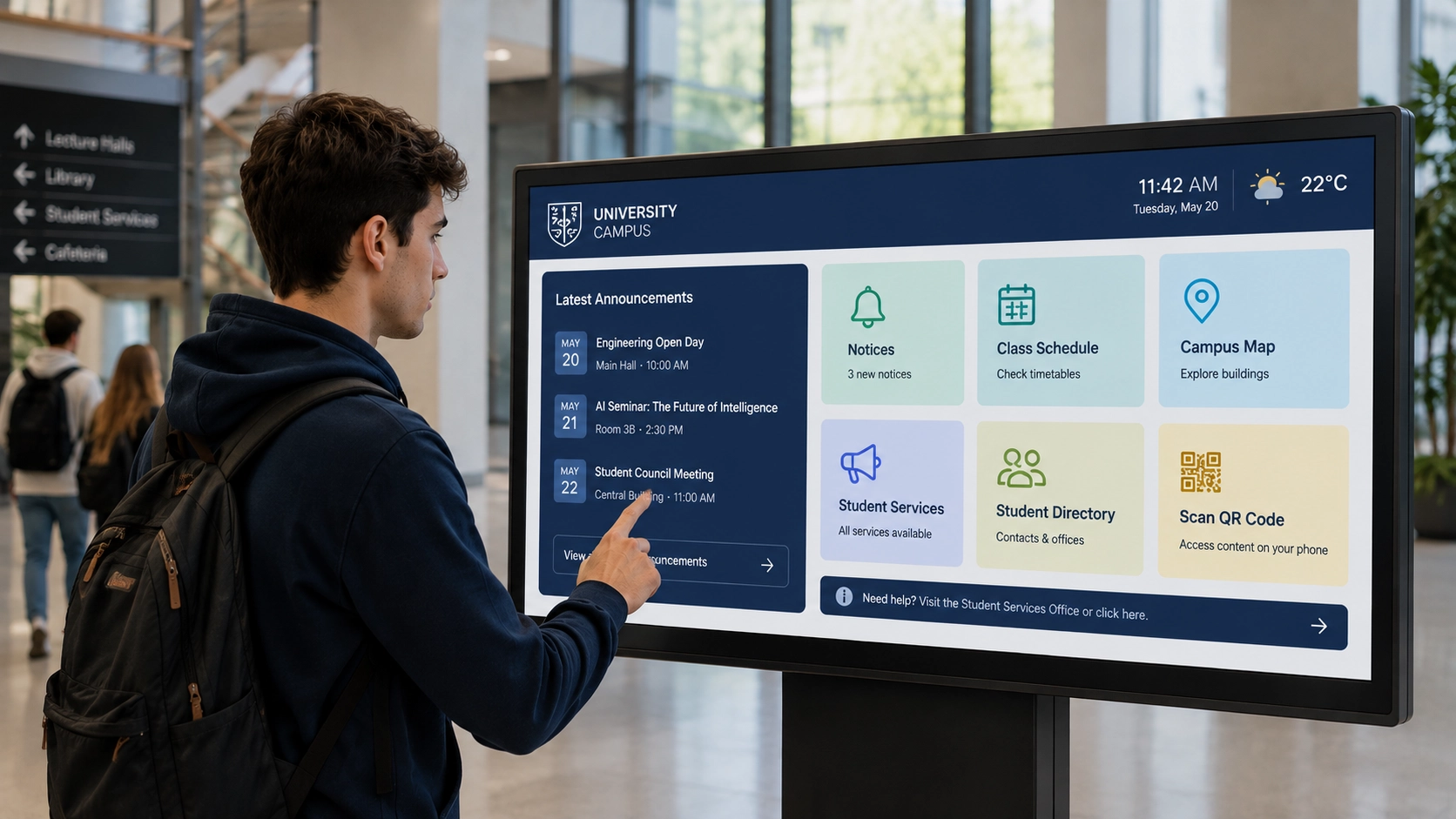
A university campus with 12 buildings posts weekly updates across 40 notice boards. Events, room changes, safety notices, HR announcements. Every Monday, a staff member walks the buildings, replaces printed sheets, and hopes nothing changes before Friday. When something does change mid-week — a cancelled lecture, a rescheduled exam — the paper stays up until someone notices and makes the walk again.
This is not an edge case. It is the standard operating model for bulletin boards in corporate offices and educational institutions across the world. The problem is not the information. It is the distribution.
Why Physical Notice Boards Fail at Scale
The core issue with a physical notice board is that it requires a human in the loop for every single update. That human has to create the content, print or write it, travel to the board, pin it, and later remove it. Multiply that by 40 locations, three content owners, and five weekly updates, and you have a process that costs real time and still produces stale information.
Digital displays solve the distribution problem, but only partially. A screen that plays a looping slideshow is faster to update than a pin board, but it still requires someone to log in, edit a layout, export a file, and push it to the device. If the content owner is the IT department, marketing waits. If it is marketing, IT waits. Either way, the board is never quite current.
The result is a digital notice board that looks modern but behaves like its paper predecessor.
What Changes When the Board Becomes Interactive
Live Billboard, the Livesignage app designed for digital bulletin boards in corporate and educational environments, separates the display layer from the content layer entirely.
Content owners — an HR coordinator, a facilities manager, a department secretary — submit updates through a structured form or a connected data source. The board updates automatically. No design software. No file exports. No access to the display system. The person who knows the information is the person who publishes it, without touching the screen configuration.
The touch layer adds a second dimension. A visitor at the board can browse a full event calendar, filter by department or building, expand a notice for details, or navigate a campus map. The board stops being a broadcast medium and becomes a self-service information point. This is the operational difference between a digital bulletin board and an interactive board: one pushes information, the other lets the viewer pull what they need.
QR Codes as the Bridge Between Screen and Device
Touch works well for a screen positioned at eye level in a corridor. It works less well for a display mounted high on a wall, or in a location where people pass quickly without stopping. QR codes solve this.
Live Billboard generates QR codes dynamically, linked to specific content items. A notice about a training session can carry a QR code that opens the registration form on the viewer's phone. An event listing can link directly to the calendar invite. A safety procedure can open the full PDF without requiring the viewer to search for it later.
This is not a static QR printed once and forgotten. The code is tied to the content record, so when the event date changes or the registration link updates, the destination updates automatically. The QR on the screen always points to the current version.
For corporate environments, this means an employee can scan a notice about a policy update and read the full document on their phone during their commute. For a university, a student can scan a room booking confirmation and add it to their calendar in two taps. The digital bulletin board becomes the starting point of an action, not just the display of information.
Multi-Location Management Without Multiplying Effort
The scenario that breaks most digital notice board deployments is multi-site scale. A company with offices in five cities, or a university with two campuses, needs boards that share some content (company-wide announcements, institutional news) and display other content locally (building-specific events, local HR contacts).
Live Billboard handles this through a content hierarchy. Global content is published once and appears on every board in the network. Local content is managed by the local owner and appears only on the relevant displays. The central communications team does not need to coordinate with every site. The local administrator does not need access to the global system.
For IT, this means one platform to manage, one set of credentials to maintain, one update cycle for the software. Hardware compatibility covers Samsung, Philips, LG, BrightSign, and Google devices, as well as Android and Android TV — which means the platform works with what is already installed, not only with new hardware purchases.
Measuring Whether the Board Is Actually Working
One of the persistent problems with notice boards — physical or digital — is that there is no feedback loop. Content goes up, and no one knows whether anyone read it.
Live Billboard tracks interaction data: which notices were tapped, which QR codes were scanned, which content items received the most dwell time. This is not analytics for its own sake. It tells a communications manager whether the board in the main lobby performs differently from the one near the cafeteria, and whether a notice format with a QR code generates more follow-through than one without.
Across corporate and educational deployments using interactive boards connected to structured content workflows, engagement with digital notice boards increased by 85% compared to static display equivalents. The driver was not the hardware change. It was the combination of content relevance — because owners updated more frequently when the process was easier — and interactive access, which gave viewers a reason to stop rather than glance.
Livesignage, a 3x Digital Signage Awards Winner (2024, 2025, 2026), built Live Billboard specifically for environments where information density is high, content ownership is distributed, and the board needs to serve multiple audiences simultaneously.
When a Digital Bulletin Board Upgrade Is Worth Prioritising
The case for moving from a static display — or from paper — to an interactive digital bulletin board is clearest when three conditions are present: content changes frequently, ownership is distributed across teams or departments, and the audience needs to act on what they see, not just read it.
A corporate campus with active HR, facilities, and communications teams publishing to shared spaces meets all three. A university with department-level event management and student-facing services meets all three. In both cases, the cost of the current process — staff time, outdated information, missed communications — is already significant. The question is whether the replacement is simple enough to actually be used.
If you manage a network of displays across multiple buildings or sites and want to see how Live Billboard handles content workflows, touch interaction, and QR integration in practice, you can book a demo with a Livesignage specialist.