
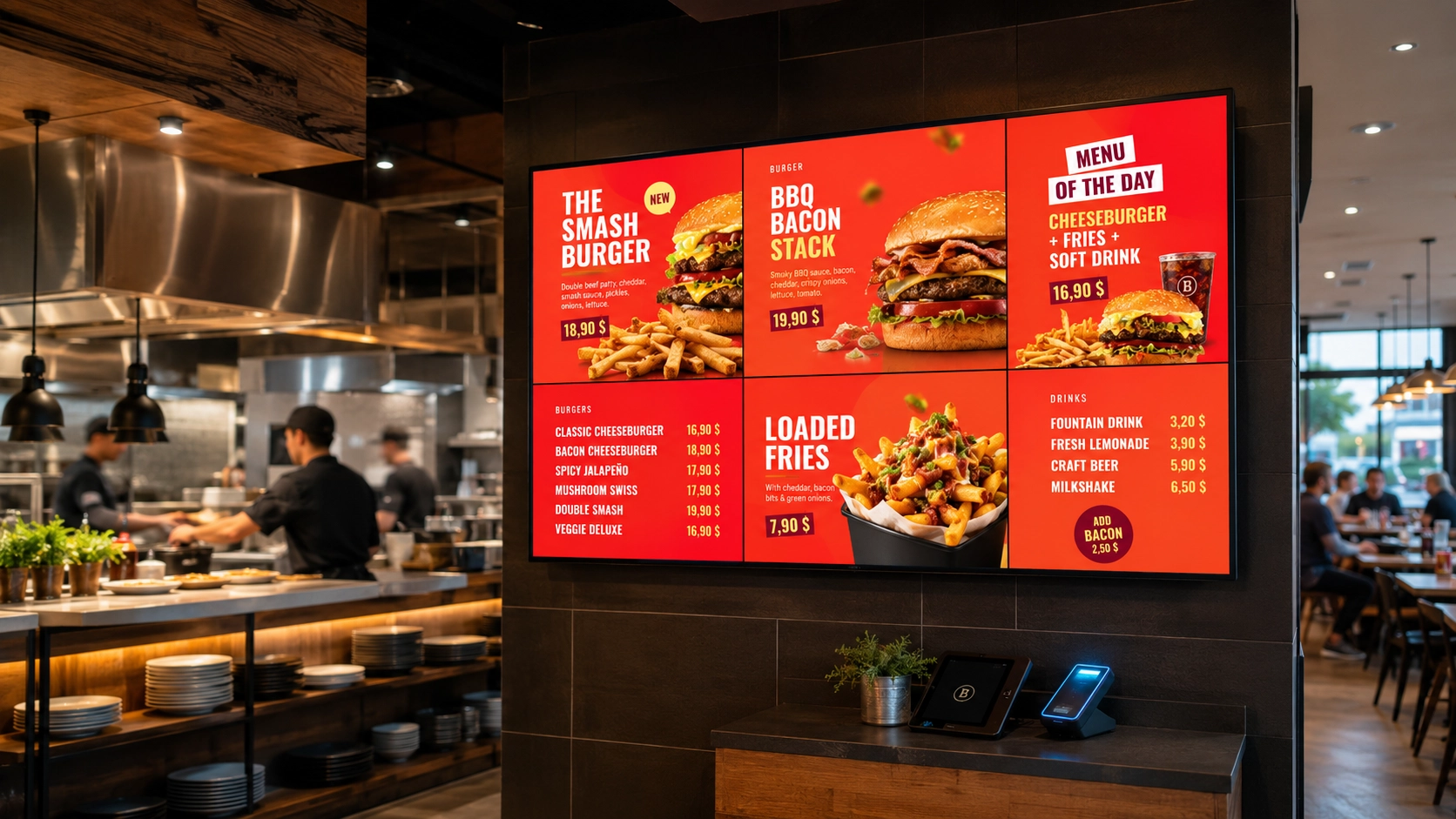
A QSR chain with 35 locations updates its menu prices every Thursday. The process: a central team emails a revised spreadsheet to each store manager, who then manually edits the digital menu board software, screen by screen. On a busy week, two or three stores miss the update. Customers order at the old price. The margin gap is small per transaction, but across 35 locations and 52 weeks, it adds up to a number that justifies a serious conversation about how menu boards actually work.
Why Static Thinking Breaks Dynamic Operations
Most restaurant operators approach digital menu boards the way they approached printed ones: design once, display indefinitely, update when you remember. The hardware is digital; the workflow is not.
This creates three compounding problems. First, pricing accuracy: when your cost of goods shifts, your displayed price should shift with it. Manual updates introduce lag, and lag introduces margin erosion or customer friction. Second, daypart management: a breakfast menu running at 11:30am because someone forgot to switch the board is a credibility problem, not just an operational one. Third, promotional alignment: a limited-time offer that appears on the app but not on the in-store board is a missed conversion at the exact moment the customer is ready to buy.
The assumption that digital menu boards are simply "screens with a slide deck" is where most of the operational cost hides.
What a Menu Board Setup Actually Requires
A functional digital menu board deployment has four layers, and skipping any one of them creates problems downstream.
Hardware selection. Commercial-grade displays—Samsung, LG, Philips—are built for continuous operation. Consumer TVs are not. Brightness matters in environments with natural light or overhead fluorescent lighting: 500 nits is a minimum for most QSR counters; window-facing displays need more. Player hardware (BrightSign, Android-based SoC built into the display) determines what the software can do.
Content management platform. This is where most operators underinvest. A platform that only plays back static assets requires manual intervention every time anything changes. A platform connected to live data sources does not.
Network infrastructure. Reliable connectivity is non-negotiable for remote management. A display that loses its connection and falls back to cached content from three weeks ago is a liability, not an asset.
Content design. Legibility at counter distance, clear hierarchy between categories and items, contrast ratios that work under kitchen lighting—these are not aesthetic choices. They directly affect order speed and average ticket value. A cluttered board slows decision-making. A well-structured board guides it.
Connecting Menu Boards to Live Data Sources
The operational step that separates a managed display from a genuine digital menu board system is the data connection. When pricing, availability and promotional content are pulled from a live source—a POS system, an ERP, a Google Sheet updated by the central purchasing team—the board updates itself.
This is the core function of Livesignage's data source integrations. The platform connects directly to spreadsheets, ERPs, CRMs, and external feeds. When a value changes in the source, the display updates without anyone touching the CMS. No email chains, no store-level logins, no version mismatches across locations.
For a QSR operator managing dayparts, this means the breakfast menu transitions to the lunch menu on a schedule, not on a manager's memory. For a restaurant with variable ingredient costs, it means a price adjustment made in the central system appears on every board in every location within minutes.
The reduction in manual editing is significant: operators using connected data sources report up to 73% fewer manual content edits across their networks. That is time returned to operations, not spent on content maintenance.
Dynamic Pricing on Menu Boards: What It Means in Practice
Dynamic pricing in QSR is not the same as surge pricing in ride-hailing. It is more precise and more operationally grounded. It means: the price displayed reflects the price that is currently correct, based on cost, time, demand signal or promotional rule.
Practical applications:
None of these require a designer to open a template and manually change a number. They require a data connection and a rule. The menu board becomes an output of the business logic, not a separate maintenance task.
Across multi-location restaurant groups that have implemented this model, the impact on conversion is measurable. When suggested items on digital displays are matched to real-time inventory and daypart logic, the lift in attachment rate is consistent. In one deployment across a network of coffee and bakery locations, connecting the menu board system to the POS and loyalty CRM produced a 67% increase in conversions on upsell items promoted at the point of order.
Designing for Order Speed, Not Just Visual Appeal
Menu board design in QSR has one primary metric: time to decision. A customer who spends 45 seconds reading a board is a customer who is not yet ordering. A customer who reaches the counter already knowing what they want is an efficient transaction.
Design principles that serve this goal:
- Limit the number of choices visible at once. Showing every possible product creates cognitive load. Categories, best sellers and priority items should be immediately identifiable.
- Build a clear visual hierarchy. Product names, prices, descriptions and promotional messages should not compete for attention. The customer needs to understand what to look at first.
- Keep prices easy to scan. Consistent alignment and typography make comparison faster, especially when customers are choosing between sizes, combinations or meal options.
- Use movement selectively. Animation can attract attention to a promotion, but constantly moving menus make information harder to read. Motion should guide the eye, not distract it.
- Design for the real viewing distance. A layout that looks clear on a laptop may fail completely on a screen several metres away. Font size, contrast and image detail need to be tested in the actual environment.
- Give promotional areas a specific role. Instead of adding more messages wherever space is available, reserve defined areas for upselling, bundles or limited-time offers so that promotional content does not interfere with the core menu.
When the content management platform is connected to live data, these design principles can be built into templates once. The layout holds; only the values change. A promotion slot in the template fills with whatever item the central team has flagged in the source data—no redesign required.
When to Reconsider Your Current Setup
If your menu board workflow involves any of the following, the operational cost is higher than it needs to be: manual price updates sent by email or messaging app; daypart changes that depend on a staff member pressing a button; promotional content that goes live in some locations but not others; a design process that requires opening a template every time a price changes.
The technology to eliminate each of these exists and is deployable on the hardware most operators already have—Samsung and LG commercial displays, BrightSign players, Android SoC panels.
If you manage a restaurant network and want to see how data-connected menu boards work in practice, you can book a demo with a Livesignage specialist and walk through a setup mapped to your current systems.